During Public Preview you can use the Team plan for free, and get an early-adopter discount at GA. Sign in
Using Locally with .NET Aspire
Aspire (formerly .NET Aspire) describes a distributed app in code: its projects, the Azure resources they use, and how they connect. You can provision those resources in an Azure subscription using aspire run, which then provides each project its connection strings.
You can run your Aspire application against Locally by prefixing that with locally run, for example:
                $


            locally run aspire run
This provisions the infrastructure your Aspire application needs in Locally, then runs your application against it. Since everything is provisioned in Locally, you don't need to use Aspire's emulator containers.
To do this, you'll need to add two NuGet packages to your application. These are open source and available in locallybuild/locally-dotnet. They only take effect when running under locally run, so the same code continues to work against Azure.
A complete example is available in locallybuild/example-app-service-aspire.
This guide was tested with Locally v2026.11 and these package versions. Newer versions should work too.
Aspire.Hosting.Azure.*, and Aspire's client integrations such asAspire.Azure.*,Aspire.Microsoft.*andAspire.StackExchange.Redis-v13.6.5Locally.Aspire.Hosting-v1.0.1Locally.Aspire.Client-v1.0.1
Configuring the AppHost
Add Locally.Aspire.Hosting to your AppHost project:
                $


            dotnet add package Locally.Aspire.Hosting
Then call AddLocally() straight after creating the builder:
var builder = DistributedApplication.CreateBuilder(args);

// Under `locally run`, provision these in Locally.
builder.AddLocally();

var cache = builder.AddAzureManagedRedis("cache");

var storage = builder.AddAzureStorage("storage");
var entries = storage.AddBlobContainer("entries");
var submissions = storage.AddQueue("submissions");

builder.AddProject<Projects.Api>("api")
    .WithReference(cache).WaitFor(cache)
    .WithReference(entries).WaitFor(entries)
    .WithReference(submissions).WaitFor(submissions);

builder.Build().Run();
Under locally run, AddLocally():
- sends Aspire's Azure Resource Manager requests to Locally's Control Plane
- signs Aspire in as the identity
locally runprovides, in the Subscription, Tenant and region it selected - re-provisions everything after Locally restarts. Locally starts empty each time (unless you use
--persist), but Aspire would otherwise assume the resources from its last run still exist - points each resource's link in the Aspire dashboard at the Locally Dashboard instead of the Azure portal
Aspire doesn't provision resources marked RunAsEmulator() or RunAsContainer(), so remove those calls for anything Locally should provide. If you still want the emulator when you're not using Locally, check IsLocallyRun():
var storage = builder.AddAzureStorage("storage");
if (!builder.IsLocallyRun())
{
    storage.RunAsEmulator();
}
Configuring your projects
Add Locally.Aspire.Client to each project that connects to an Azure resource:
                $


            dotnet add package Locally.Aspire.Client
Then call UseLocallyCredential() before you add your Azure clients:
var builder = WebApplication.CreateBuilder(args);

// Sign Azure clients in to Locally, when run there.
builder.UseLocallyCredential();

builder.AddAzureBlobContainerClient("entries");
builder.AddAzureQueue("submissions");
builder.AddRedisClient("cache");
Under locally run, this does two things:
-
It turns off instance discovery for every Azure client Aspire builds. Before its first token, the Azure SDK's sign-in library asks login.microsoftonline.com whether the endpoint it's signing in to belongs to Microsoft, and Locally's doesn't.
locally runsetsAZURE_DISABLE_INSTANCE_DISCOVERYfor this, but the Azure SDK for .NET ignores that variable. -
It signs Redis clients in to Locally's caches with a Microsoft Entra token. Aspire's
WithAzureAuthentication()only does this for Azure's own cache host names.
Outside locally run it does nothing, so once your app is deployed (to Locally or to Azure) it signs in with its Managed Identity as usual.
To check whether a project is running under locally run, call builder.IsLocallyRun(), or IsLocallyRun() on the app's configuration once it's built.
To use a real Azure resource alongside Locally's, give its client its own credential, which takes precedence over UseLocallyCredential(). The AppHost passes the resource's address to the project, for example with AddConnectionString("archive"):
using Azure.Identity;

// A real Azure account: name Entra ID's authority, as
// `locally run` points AZURE_AUTHORITY_HOST at Locally.
var azure = new ClientSecretCredential(
    builder.Configuration["Archive:TenantId"],
    builder.Configuration["Archive:ClientId"],
    builder.Configuration["Archive:ClientSecret"],
    new ClientSecretCredentialOptions
    {
        AuthorityHost = AzureAuthorityHosts.AzurePublicCloud,
    });

builder.AddAzureBlobContainerClient("archive",
    settings => settings.Credential = azure);
Aspire's PostgreSQL, Cosmos DB and App Configuration clients create their own credential, so pass each one a LocallyCredential. If you don't, an App Configuration source with Optional = true fails silently and your app starts with empty configuration:
using Locally.Aspire.Client;

builder.AddAzureNpgsqlDataSource("db", settings =>
    settings.Credential = new LocallyCredential());

builder.AddAzureCosmosClient("cosmos", settings =>
    settings.Credential = new LocallyCredential());

builder.AddAzureAppConfiguration("config", settings =>
    settings.Credential = new LocallyCredential());
Azure SQL doesn't go through an Azure client. Aspire's connection string tells Microsoft.Data.SqlClient to sign itself in, which calls login.microsoftonline.com. Remove that setting and give the connection a token from LocallyCredential instead:
using Azure.Core;
using Locally.Aspire.Client;
using Microsoft.Data.SqlClient;

// Aspire's connection string has SqlClient sign itself in, so
// remove that and give the connection a token instead.
var credential = new LocallyCredential();
var connectionString = new SqlConnectionStringBuilder(
    builder.Configuration.GetConnectionString("db"));
connectionString.Remove("Authentication");

await using var connection = new SqlConnection(connectionString.ConnectionString)
{
    AccessTokenCallback = async (context, cancellationToken) =>
    {
        var token = await credential.GetTokenAsync(
            new TokenRequestContext([context.Resource.TrimEnd('/') + "/.default"]),
            cancellationToken);
        return new SqlAuthenticationToken(token.Token, token.ExpiresOn);
    },
};
Running your app
With Locally running, start the AppHost with the Aspire CLI, prefixed with locally run:
                $


            locally run aspire run
The first run creates a Resource Group named rg-aspire-<apphost>-<hash>, deploys your resources into it and grants your locally run identity the roles your projects need. That takes a minute or so. Later runs reuse the same resources and start in seconds.
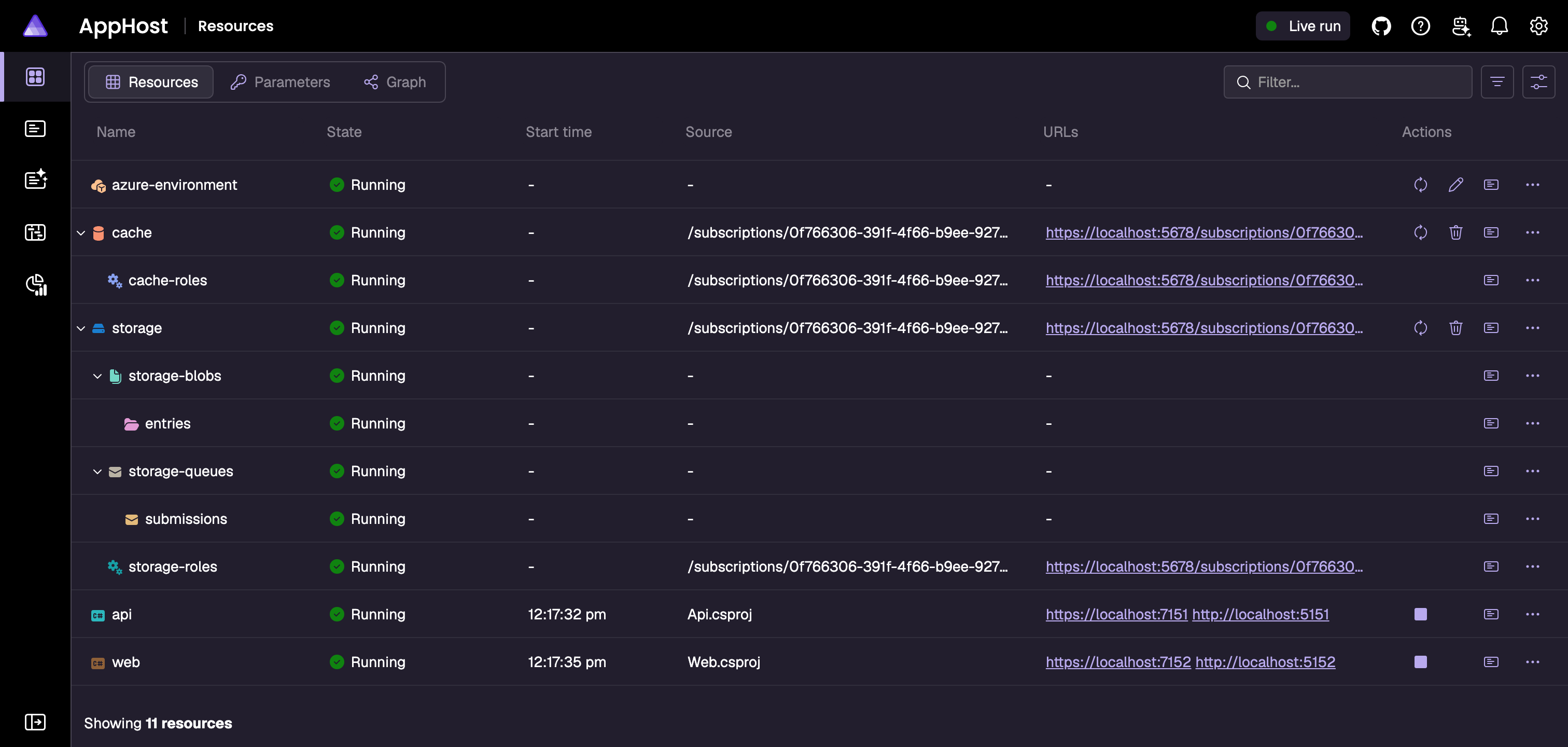
Resources appear in the Aspire dashboard as they're provisioned, and each project starts once the resources it waits for are healthy. Click a resource's link to open it in the Locally Dashboard.
Should you encounter any issues, please take a look at the troubleshooting section, reach out in our Discord or open an issue and we'll take a look.
Supported integrations
These Aspire hosting integrations work with aspire run, and deploy with aspire publish and locally deploy:
- Application Insights and Log Analytics
- Azure Cache for Redis (
AddAzureRedis) - Azure Managed Redis (
AddAzureManagedRedis) - Event Hubs
- Key Vault (secrets)
- Service Bus (queues, topics and subscriptions)
- Storage (blobs, queues and tables)
These work with caveats:
- App Configuration, Azure Database for PostgreSQL flexible server and Cosmos DB need a
LocallyCredentialpassed to their clients (see Configuring your projects). - Azure SQL needs a token from
LocallyCredentialon each connection (see Configuring your projects). - Azure AI Search provisions and deploys, but Locally doesn't have a Search data plane yet, so clients can't use it.
- Container Registry and Virtual Network deploy from
aspire publish. Aspire skips them inaspire run, against Azure too.
Azure OpenAI, SignalR and Web PubSub aren't supported yet. To check a resource type against your Locally install, run locally plugin supports, for example locally plugin supports Microsoft.Cache/redisEnterprise.
Deploying your app
aspire run runs your projects on your machine. To run them in Locally as well, use aspire deploy, again prefixed with locally run:
                $


            locally run aspire deploy
Aspire compiles the AppHost to Bicep and deploys it, then builds your projects' images and pushes them to the Container Registry it created. Each project runs as an App Service web app in Locally, with the same packages, and sends its telemetry to the Aspire dashboard through the OpenTelemetry collector sidecar Aspire adds.
Aspire's Bicep hardcodes some of Azure's host names and ports, which differ in Locally: App Service service discovery, the Aspire dashboard's URL, and the ports in both kinds of Redis connection string. AddLocally() makes the Bicep read these from the deployed resource instead. Against Azure the values come out the same as before.
Projects deploy to an App Service environment (AddAzureAppServiceEnvironment). Container Apps environments don't deploy to Locally yet, because Locally doesn't support the dashboard component Aspire adds to them.
example-app-service-aspire is a complete app deployed this way: a guestbook on App Service using Blob Storage, Queue Storage and Azure Managed Redis.
Next steps
Using Locally with the Azure SDK for .NET covers Azure SDK clients you construct yourself, and Using Locally in CI shows how to run Locally in your pipeline. The Data Plane Emulators explain how Locally serves the Storage, Key Vault, Service Bus and other endpoints your projects connect to.
During Public Preview you can use the Team plan for free, and get an early-adopter discount at GA. Sign in
