Provisioning a Virtual Network
Sign in during Public Preview to get the Team plan free, plus an early-adopter discount when we launch. Sign in
Provisioning a Virtual Network
This guide shows you how to provision a Virtual Network against Locally. As with the other guides we're going to use the Azure CLI, but the same resources can be provisioned with HashiCorp Terraform, Pulumi or Bicep too.
Before you start
- The Azure CLI (
az) installed. - Locally installed, with Locally Setup completed.
1. Start Locally
Firstly, we need to launch Locally which we can do from a terminal by running:
                $


            locally build
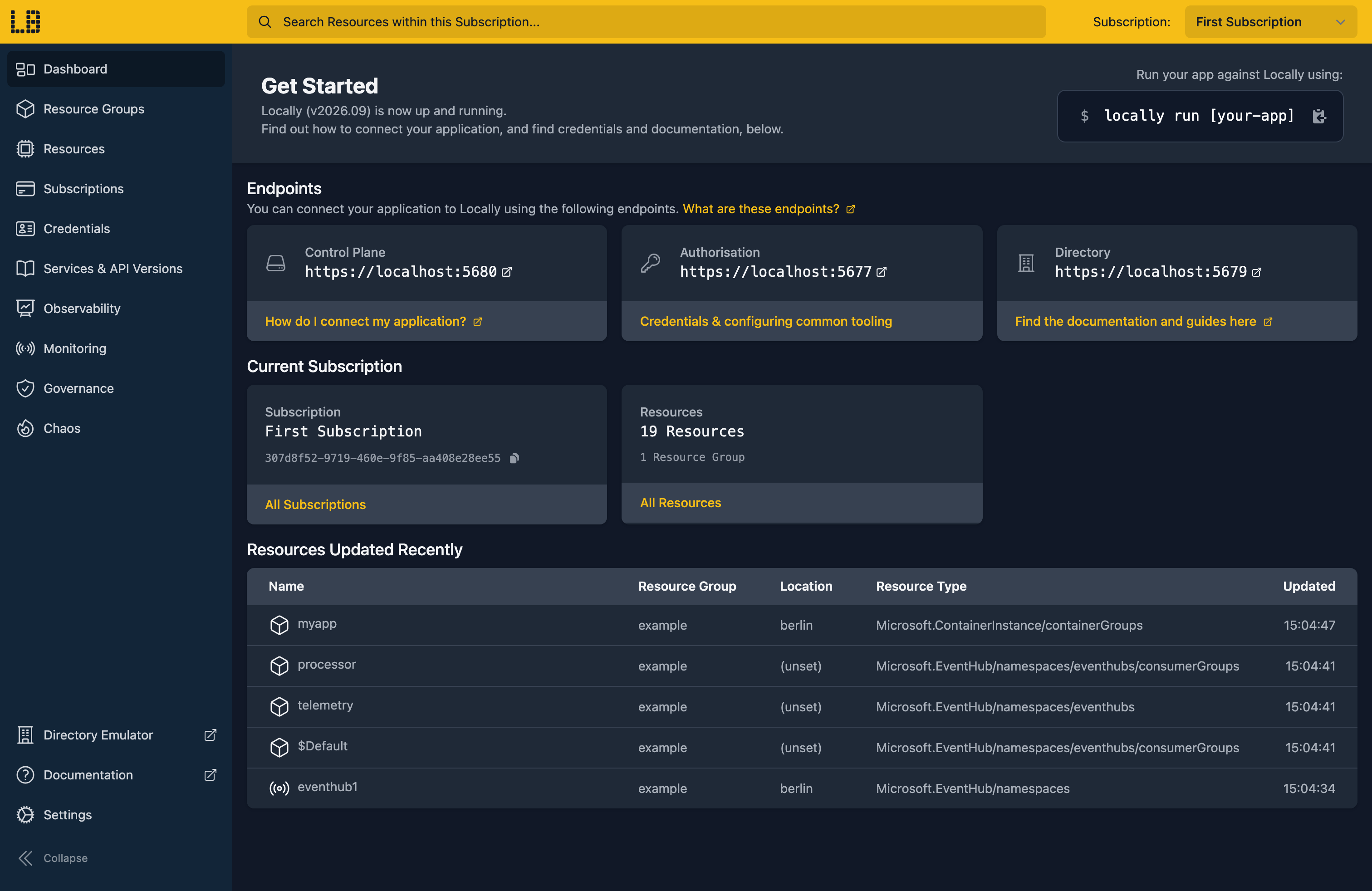
Once Locally has started, the Locally Dashboard will open automatically:
2. Create a Resource Group
Next we can create the Resource Group:
                $


            locally run az group create -n sample-resources -l berlin
There's two things to note here:
- The Azure CLI supports Automatic Configuration, meaning that it can automatically be configured to work against Locally just by prefixing commands with
locally run. - Locally intentionally uses a different set of locations to Azure as a safety precaution, so that you can be confident you're deploying against Locally rather than regular Azure. You can also configure Locally to use the Azure locations too, but you'll want to be extra sure that you're prefixing commands with
locally runwhen you do.
3. Create the Virtual Network
With the Resource Group in place, we can create the Virtual Network. A virtual network needs an address space, and it's usually convenient to create a first subnet at the same time:
                $


            locally run az network vnet create -g sample-resources -n sample-vnet --address-prefixes 10.0.0.0/16 --subnet-name internal --subnet-prefixes 10.0.1.0/24
{
  "name": "sample-vnet",
  "prefixes": [
    "10.0.0.0/16"
  ],
  "state": "Succeeded",
  "subnets": [
    {
      "name": "internal",
      "prefix": "10.0.1.0/24"
    }
  ]
}
Note
Most networks end up with more than one subnet, so let's add a second. Subnet prefixes have to sit inside the virtual network's address space and must not overlap each other:
                $


            locally run az network vnet subnet create -g sample-resources --vnet-name sample-vnet -n workloads --address-prefixes 10.0.2.0/24
{
  "name": "workloads",
  "prefix": "10.0.2.0/24",
  "state": "Succeeded"
}
We can confirm both are there:
                $


            locally run az network vnet subnet list -g sample-resources --vnet-name sample-vnet --query "[].{Name:name, Prefix:addressPrefix}" -o table
Name       Prefix
---------  -----------
internal   10.0.1.0/24
workloads  10.0.2.0/24
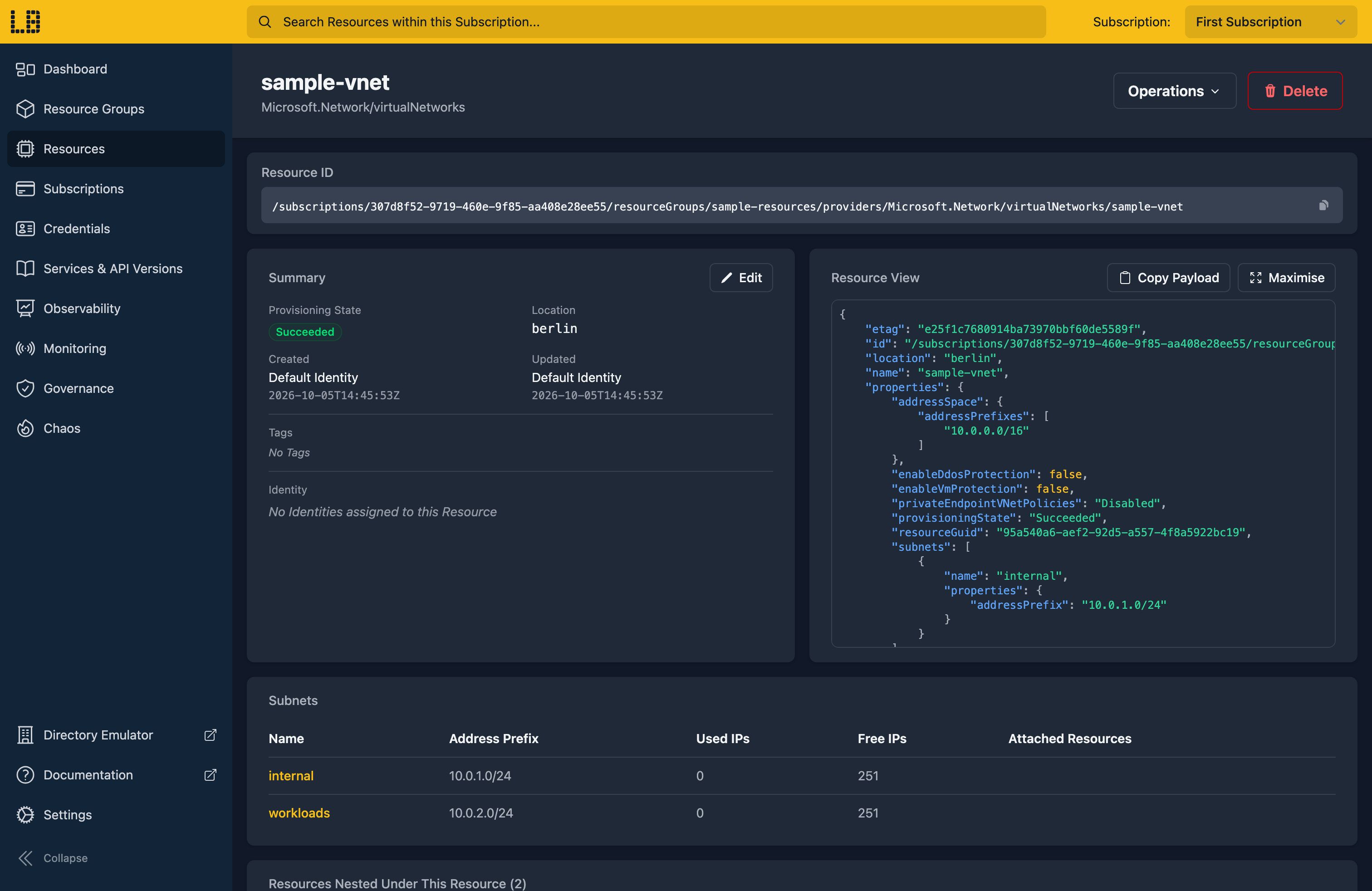
We can see the Virtual Network in the Locally Dashboard too:
4. Tidy up
Finally, we can tidy up. To remove the Resource Group and everything within it:
                $


            locally run az group delete -n sample-resources --yes
There's nothing billable to clean up, since everything ran on your machine, but it's still worth checking your teardown scripts work here before you run them against Azure.
Doing this with other tooling
Whilst this guide used the Azure CLI, Virtual Networks work the same way through any of the tooling that Locally supports - a Microsoft.Network/virtualNetworks resource in HashiCorp Terraform or OpenTofu, Pulumi, Bicep or an ARM Template all provision against Locally in the same way, with only the location changed.
Next steps
To control what traffic a subnet allows, add a Network Security Group, and give it outbound access with a NAT Gateway. To reach Virtual Machines in the network without a Public IP, see Bastion.
Should you encounter any issues, please take a look at the troubleshooting section.
Sign in during Public Preview to get the Team plan free, plus an early-adopter discount when we launch. Sign in
