Preview

Sign in during Public Preview to get the Team plan free, plus an early-adopter discount when we launch. Sign in

For Developers

Built for the way you build.

A complete Azure environment on your machine. Iterate on your infrastructure and your application in seconds, test them against real data plane emulators, debug with full observability, and never touch a shared subscription.

On your machine. Online or offline.

Locally runs entirely on your machine. There's no Azure subscription to request, no shared environment, and no Azure bill. Develop infrastructure on a plane, on a train, or anywhere you write your best code.

No connection to Azure
Nothing you provision reaches Azure. It doesn't create real Azure resources, and no Azure costs are ever incurred.
Works fully offline
Run Locally fully offline day to day - it just needs an internet connection every 32 days to check your licence. The dashboard, control plane, identity and data planes all run locally.
Per-developer environments
Every developer gets their own complete Azure environment, so nobody is working in anyone else's subscription or overwriting anyone else's resources. Rolling it out to a team? For Teams →

0

API calls to Azure

16

Data plane emulators

100%

On your machine

Need a realistic database? Locally launches a container via Docker or Podman if you have them installed - still on your machine, never in the cloud.

Locally emulates Application Insights, Log Analytics and Azure Monitor metrics and alerts too, so you can work with the logs and metrics you expect.

Iterate on Infrastructure as Code in seconds.

Prefix any Infrastructure as Code command with locally run and credentials are injected automatically. Apply, destroy and re-apply in a tight loop - no rate limits, no shared state, no minute-long round-trips.

Terraform & OpenTofu
Run azurerm, azapi, or an existing configuration against Locally. OpenTofu works the same way.
Pulumi
Both Azure Native and Azure Classic providers work against Locally.
Bicep & ARM
First-class support for Bicep and raw ARM templates - same deploy semantics as Azure.
Azure CLI & PowerShell
locally run az runs Azure CLI commands against your local environment, and locally run pwsh drops you into an Azure PowerShell session that's already signed in.
Automatic configuration
No SDK swap, no DNS hack - Locally configures every supported tool for you. How it works →

# Your existing Infrastructure as Code, pointed at a Locally region

$ locally run terraform init

Terraform has been successfully initialized!

$ locally run terraform apply -auto-approve

Apply complete! Resources: 6 added, 0 changed, 0 destroyed.

# 35s on Locally. The same apply against Azure: 2m 6s.

Real data planes.

Key Vault, Service Bus, Storage, Cosmos DB, Event Hubs, Functions, App Service and more - 16 emulators in all. Your CLIs run with the locally run prefix, and SDK apps need a few lines of setup. Rotate secrets, pub/sub messages, upload blobs - the data planes your application talks to, on your machine.

Key Vault
Secrets, keys and certificates. Full version history and soft-delete recovery.
Service Bus
Queues, topics, subscriptions, consumer groups and dead letters - your existing clients pub/sub the way they would against Azure.
Storage
Blob, Queue, Table and File. Connect with your existing Azure Storage SDK and it works the way it would against Azure.
Your Azure SDK clients
Two settings on the client - the Locally environment, and instance discovery off - then locally run dotnet run. DefaultAzureCredential works, and apps running in the emulated App Service and Functions get Managed Identity tokens the way they do in Azure. Guides for .NET, Go and Python →

See every data plane emulator →

# Set up a container and a queue with the Locally CLI

$ locally storage container create --account demostorage --name data

Container "data" created in account "demostorage".

$ locally storage queue create --account demostorage --name orders

Queue "orders" created in account "demostorage".

# Your Storage SDK connects with the account's connection string.

Locally has built-in commands for working with the data planes - containers, queues, tables and shares without a connection string in hand. See the CLI reference →

See what's actually happening.

A local cloud you can't introspect is just a black box. The Locally Dashboard ships with logging, tracing, a live architecture diagram, a cost estimator and a least-privilege role generator - so when something doesn't behave the way you expect, the answer is one click away.

Logging
Every HTTP request and response across every Locally service, with filtering, replay and a one-click pivot to the matching trace. Learn more →
Tracing
Distributed correlation IDs stitch a single API call through every service it touched - Control Plane, emulators, identity, the lot. Learn more →
Architecture Diagrams
A live diagram of the resources you've provisioned, including data-plane sub-resources and the dependencies Locally infers between them. Learn more →
Cost Estimation
Per-resource ballpark monthly cost in USD, computed from the SKU, capacity and redundancy you've actually deployed - so you spot the expensive choices before they hit Azure. Learn more →
Minimum Necessary Permissions
Deploy to Locally, then get an Azure role definition containing only the permissions your deployment actually used - instead of handing your pipeline Contributor. Learn more →
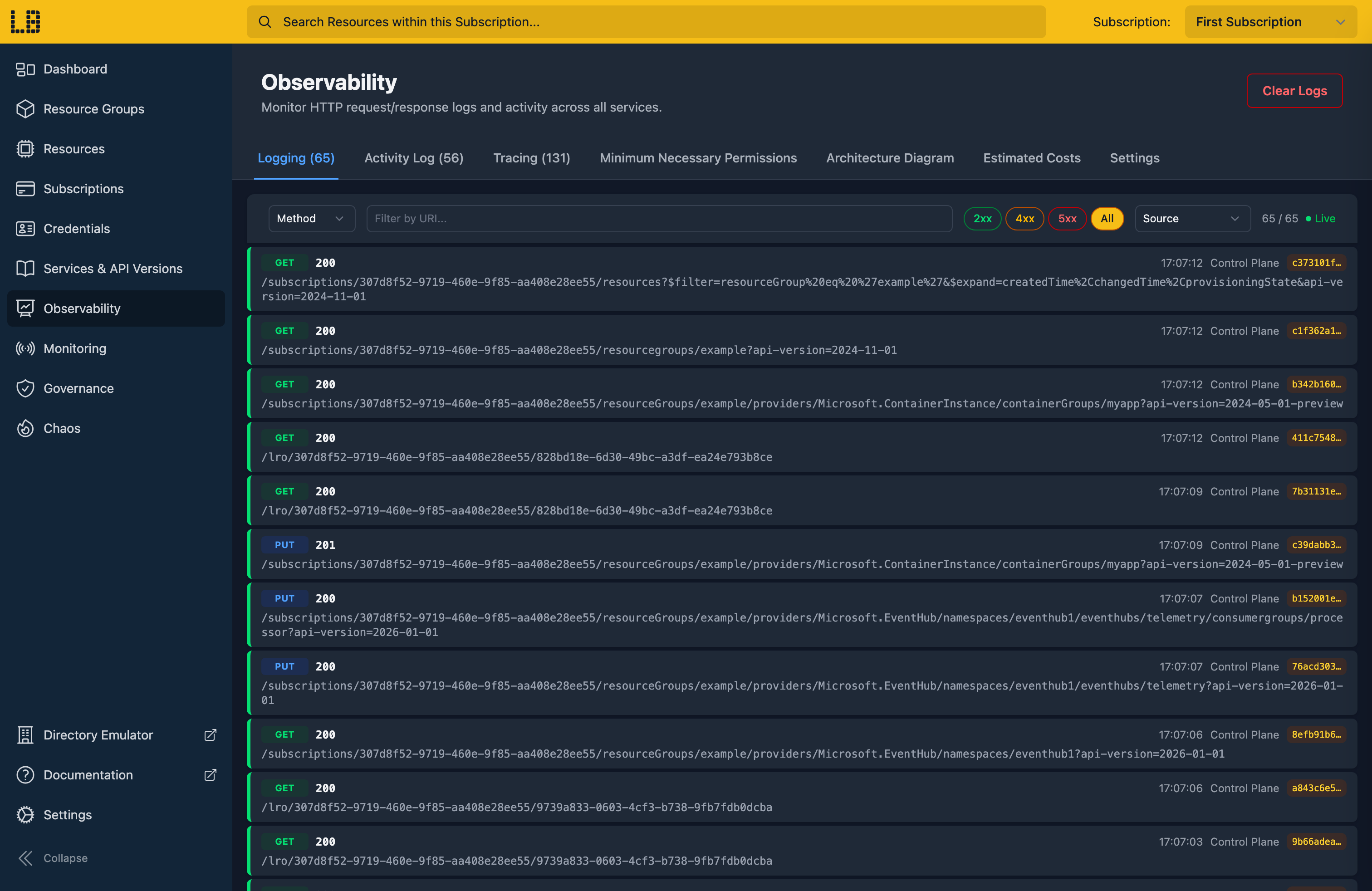
Locally Dashboard - logging view showing live HTTP requests

The Locally Dashboard's logging view - every HTTP request through your local environment, live.
Seen enough? Get your first local Azure environment running in under a minute.

Install Locally →

Does your retry logic actually work?

Azure throttles, times out and returns errors nobody planned for, and the code that handles all that usually hasn't run until the day it matters. Locally injects those failures on your machine, at a rate you choose, so you can watch your application cope before production does it for you.

Drop HTTP connections
Cut the connection mid-request and check your client recovers.
HTTP 429 and HTTP 500
Rate limiting and server errors, on whatever share of requests you set.
Latency injection
Slow Control Plane and data plane responses to find out whether your timeouts are long enough.
Resource group name recasing
Return resource group names in a different case, to catch code that compares them case-sensitively.
During long-running operations
Faults apply to long-running operations as well, so your polling code gets tested and not just the first request.

Learn more about Chaos Engineering →

# Throttle a quarter of ARM requests

$ locally chaos control-plane 429 --percentage 25

control-plane 429: now fires on 25% of all other requests.

$ locally run terraform apply

azurerm_resource_group.main: Creating...

Error: 429 Too Many Requests (chaos)

azurerm_resource_group.main: Retrying...

azurerm_resource_group.main: Creation complete

# Your retry logic just earned its keep

Your pipeline gets one too.

Start Locally at the top of the job, run your Terraform and your tests against it, and let the job tear it down. It signs in with the OIDC token your CI provider already issues, so there's nothing to store in the repo.

GitHub Actions
The setup-locally action installs and starts it, and the teardown step stops it and keeps the log if the job failed.
Any other CI
locally ci does the same from a script, using the OIDC token your provider issues.
A clean environment every run
Each job starts from an empty environment, so what failed is your change and not whatever the last run left behind.

Learn more about CI →

# .github/workflows/infra-test.yml

permissions:

id-token: write

steps:

- uses: locallybuild/setup-locally@v1

with:

user-uuid: ${{ vars.LOCALLY_USER_UUID }}

- run: locally run terraform apply -auto-approve

- run: locally run go test ./...

- uses: locallybuild/setup-locally/teardown@v1

if: always()

# Signed in with the job's OIDC token, torn down when it finishes.

Talk to your local cloud.

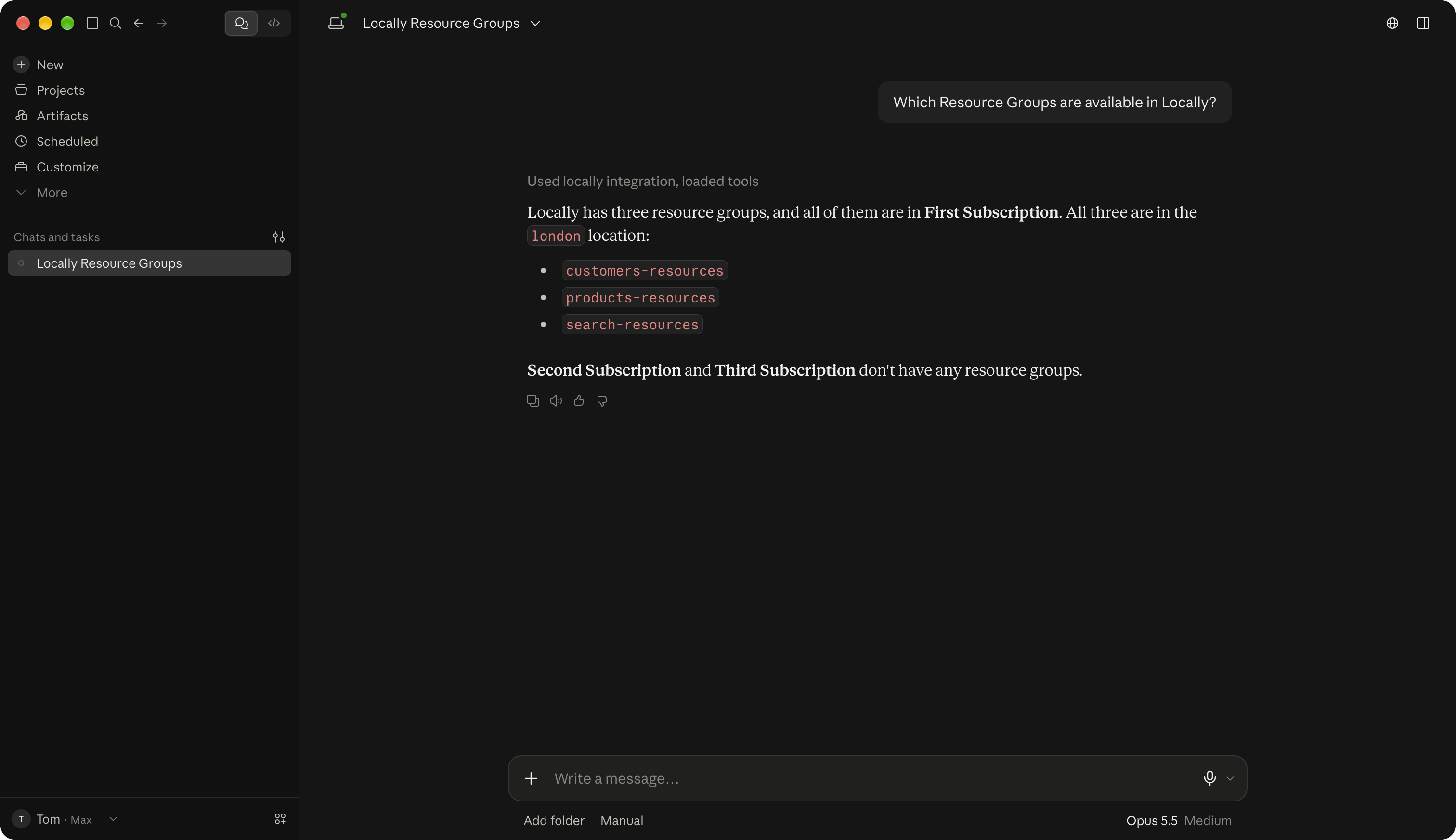
Locally bundles an MCP server, so your AI assistant can browse the resources in your local environment, look up which Azure services and API versions are supported, and run your team's runbooks - without leaving the editor.

Compatible with the assistants you already use
Claude Code, Claude Desktop, OpenCode, VS Code Copilot - any MCP-aware client.
Browse and introspect
Subscriptions, resource groups, resources, tenants, supported services and the specific API versions Locally implements.
Take action
List and deploy team runbooks from inside the assistant - no context switch out to a terminal.

Learn more about the MCP Server →

Claude Code listing resource groups via the Locally MCP server

Claude Code listing resource groups through the Locally MCP server.

Have your first local subscription running in under a minute.

Runs entirely on your machine, with the tools you already use.

Install Locally →

Or read more: For Teams · Pricing · Documentation

Not ready to install yet?

We'll send you product updates and new feature announcements. No spam, unsubscribe anytime.